


 USD - United States Dollar
 EUR - Euro
 GBP - British Pound
 CAD - Canadian Dollar
 CHF - Swiss Franc
 JPY - Japanese Yen
 AUD - Australian Dollar
 TRY - Turkish Lira
 CNY - Chinese Yuan
 INR - Indian Rupee
 UAH - Ukrainian Hryvnia
 AED - United Arab Emirat...
 AMD - Armenian Dram
 AOA - Angolan Kwanza
 ARS - Argentina Peso
 AWG - Aruba Guilder
 AZN - Azerbaijanian Mana...
 BAM - Bosnian Convertibl...
 BDT - Bangladesh Taka
 BGN - Bulgarian Lev
 BHD - Bahraini Dinar
 BIF - Burundian Franc
 BMD - Bermudian Dollar
 BND - Brunei Dollar
 BOB - Bolivian Boliviano
 BRL - Brazilian Real
 BSD - Bahamian Dollar
 BTN - Bhutanese Ngultrum
 BWP - Botswana Pula
 BZD - Belize Dollar
 CLP - Chilean Peso
 CRC - Costa Rican Colon
 CVE - Cape Verdean Escud...
 CZK - Czech Koruna
 DJF - Djiboutian Franc
 DKK - Danish Krone
 DOP - Dominican Peso
 DZD - Algerian Dinar
 EGP - Egyptian Pound
 ETB - Ethiopian Birr
 FJD - Fijian Dollar
 FKP - Falkland Island Po...
 GEL - Georgian Lari
 GGP - Guernsey Pound
 GHS - Ghanaian Cedi
 GMD - Gambian Dalasi
 GTQ - Guatemalan Quetzal
 GYD - Guyanese Dollar
 HKD - Hong Kong Dollar
 HNL - Honduran Lempira
 HRK - Croatian Kuna
 HUF - Hungarian Forint
 ILS - Israeli New Shekel
 IMP - Isle of Man Pound
 ISK - Icelandic Krona
 JEP - Jersey Pound
 KES - Kenyan Shilling
 KGS - Kyrgystani Som
 KMF - Comorian Franc
 KRW - South Korean Won
 KWD - Kuwaiti Dinar
 KZT - Kazakhstani Tenge
 LAK - Lao Kip
 LKR - Sri Lankan Rupee
 LRD - Liberian Dollar
 LSL - Lesotho Loti
 LTL - Lithuanian Litas
 LVL - Latvian Lats
 MAD - Moroccan Dirham
 MDL - Moldovan Leu
 MKD - Macedonian Denar
 MNT - Mongolian Tugrik
 MOP - Macanese Pataca
 MRO - Mauritanian Ouguiy...
 MUR - Mauritian Rupee
 MVR - Maldivian Rufiyaa
 MXN - Mexican Peso
 MYR - Malaysian Ringgit
 MZN - Mozambican Metical
 NAD - Namibian Dollar
 NIO - Nicaraguan Cordoba...
 NOK - Norwegian Krone
 NPR - Nepalese Rupee
 NZD - New Zealand Dollar
 OMR - Omani Rial
 PEN - Peruvian Nuevo Sol
 PGK - Papua New Guinean...
 PKR - Pakistani Rupee
 PLN - Polish Zloty
 PYG - Paraguayan Guarani
 QAR - Qatari Riyal
 RON - Romanian New Leu
 RSD - Serbian Dinar
 RWF - Rwandan Franc
 SAR - Saudi Riyal
 SBD - Solomon Islands Do...
 SCR - Seychellois Rupee
 SEK - Swedish Krona
 SGD - Singapore Dollar
 SHP - St. Helena Pound
 SRD - Surinamese Dollar
 SVC - Salvadoran Colon
 SZL - Swazi Lilangeni
 THB - Thai Baht
 TJS - Tajikistani Somoni
 TMT - Turkmenistani Mana...
 TND - Tunisian Dinar
 TOP - Tongan Pa`anga
 TWD - New Taiwan Dollar
 UYU - Uruguayan Peso
 WST - Samoan Tala
 ZMW - Zambian Kwacha


 Telegram Bot

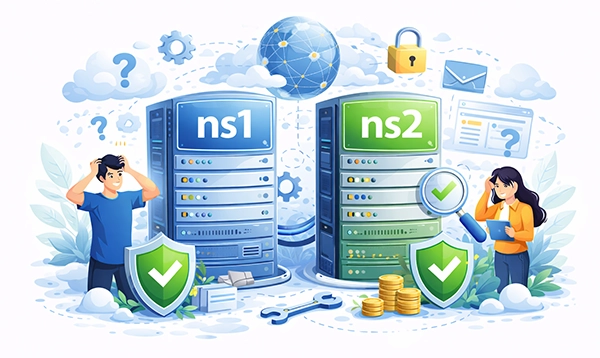
NS1 and NS2 are name servers in the Domain Name System (DNS) that are responsible for resolving domain names into IP addresses. They are authoritative DNS servers assigned to a domain to ensure redundancy, reliability, and availability.
Purpose of NS1 and NS2
- NS1 is usually the primary name server, handling DNS queries for a domain.
- NS2 is a secondary (backup) name server, ensuring continued DNS resolution if NS1 fails.
When a user enters a domain name (e.g., example.com), the request is sent to either NS1 or NS2, which responds with the correct IP address.
Why Are NS1 and NS2 Important?
Redundancy & High Availability
- If NS1 goes offline, NS2 takes over to prevent downtime.
- Multiple name servers ensure domain resolution even during outages.
Load Balancing & Performance
- Some DNS providers distribute traffic between NS1 and NS2 for faster response times.
Geographic Resilience
- NS1 and NS2 are often hosted in different data centers to protect against regional failures.
Required for Domain Registration
- Many domain registrars and ICANN regulations require a domain to have at least two name servers.
Example of NS1 and NS2 in DNS Settings
When checking a domain's DNS records (WHOIS lookup), you might see:
Name Server: NS1.EXAMPLE.COM
Name Server: NS2.EXAMPLE.COM
Or in a DNS lookup:
example.com. 3600 IN NS ns1.example.com.
example.com. 3600 IN NS ns2.example.com.
This means NS1 and NS2 are authoritative for handling DNS queries related to example.com.
How to Set Up NS1 and NS2?
- Choose a DNS Hosting Provider (e.g., Cloudflare, Google DNS, AWS Route 53).
- Create DNS Records (A, CNAME, MX, TXT) for your domain.
- Assign at least two name servers in your domain registrar's settings.
- Ensure NS1 and NS2 are synchronized (if using multiple locations).
Alternative Naming Conventions
Although NS1 and NS2 are standard, some providers use:
dns1.example.com,dns2.example.comprimary.example.com,secondary.example.com- Geo-based names:
us-west.example.com,eu-east.example.com
Summary
NS1 and NS2 are critical for DNS resolution, ensuring domains remain accessible even if one server goes offline. Having multiple name servers improves reliability, load balancing, and security.





 USD - United States Dollar
 EUR - Euro
 GBP - British Pound
 CAD - Canadian Dollar
 CHF - Swiss Franc
 JPY - Japanese Yen
 AUD - Australian Dollar
 RUB - Russian Ruble
 TRY - Turkish Lira
 CNY - Chinese Yuan
 INR - Indian Rupee
 UAH - Ukrainian Hryvnia